
Role-specific corporate AI training, built on your workflows.
In short
What is corporate AI training with GrowthPro Asia?
Worried a course will not stick, or that it is another generic AI workshop? GrowthPro Asia’s corporate AI training is the opposite: HRDC-claimable, role-specific, and built on your team’s workflows across three tracks, leadership strategy, applied business AI, and AI engineering. It can end with a working pilot on your own data, so you measure ROI, not attendance.
- HRDC-claimable
- PDPA & AIGE-aligned governance
- Pilot built on your data
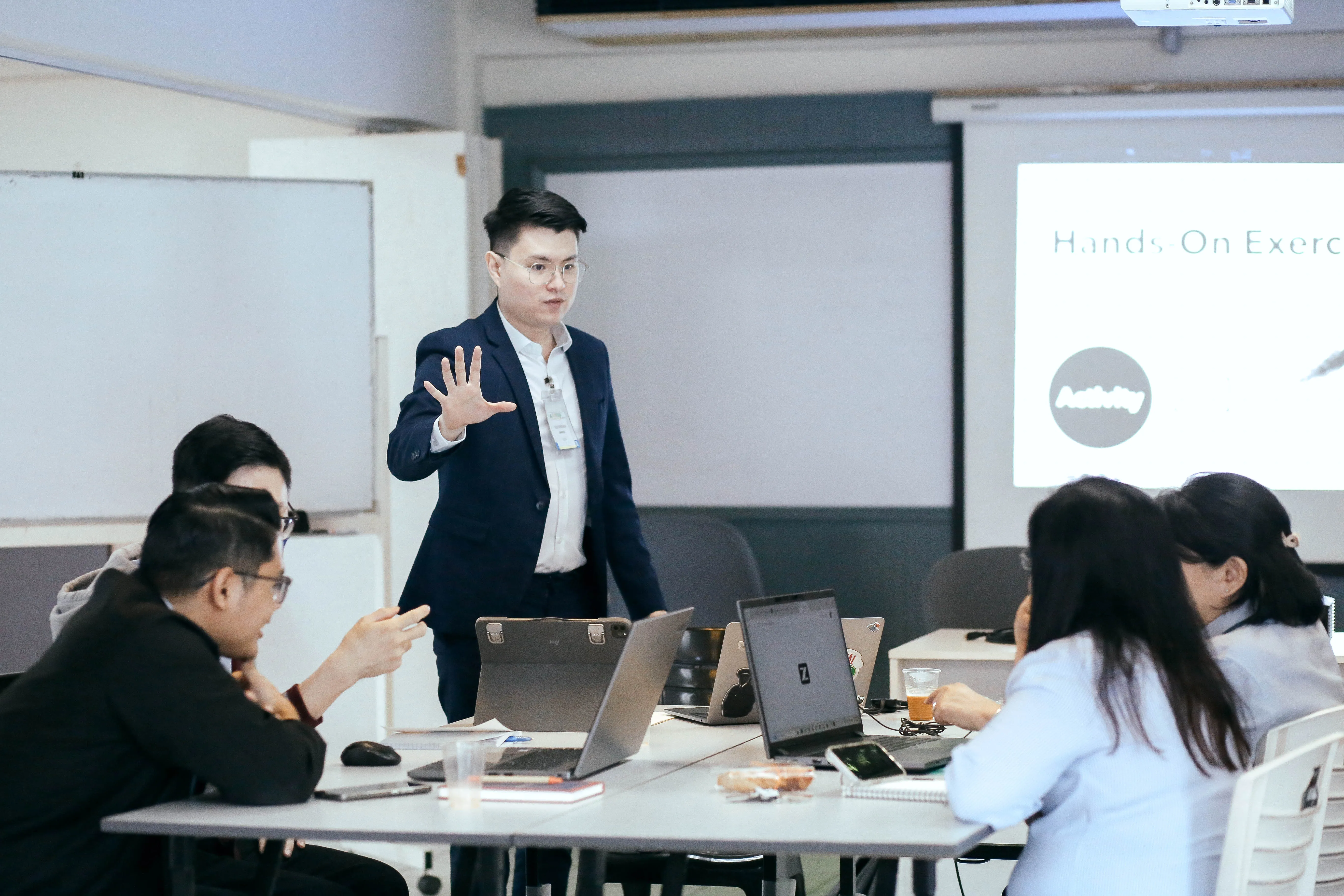
Three tracks, matched to who’s learning.
-
For C-suite & senior leadership
Leadership & Executive AI Strategy
Board-ready AI literacy, a governance framework (PDPA/AIGE), and a monetisation roadmap from the team that helped shape Malaysia’s national data agenda.
- AI roadmap
- Governance (PDPA/AIGE)
- Monetisation strategy
- Board-ready literacy
-
For HR/L&D & functional teams
Applied Business AI
Role-specific, workflow-based AI training built on your team’s real use cases, auditable, HRDC-claimable, and measured by adoption, not attendance.
- Role-specific curricula
- Workflow use cases
- Adoption support
- Claim handled for you
-
For transformation, digital & data leads
AI Engineering & Systems Intelligence
Close the pilot-to-production gap: data readiness, engineering depth, and the internal capability to scale AI beyond a proof of concept.
- Pilot-to-production
- Data readiness
- Internal capability
- Co-built pilot
Why most AI training fails to stick
Everyone else teaches your team the front door. We build the building.
Prompt-deep training teaches the tool layer and stops. Data-deep capability builds the layers underneath, the data engineering and data science that decide whether AI survives contact with real operations.
Most corporate AI training in Malaysia is prompt-deep: it teaches the tool layer and stops. Teams leave with certificates, then the workflows break the first time they touch real data, real approvals and real systems.
GrowthPro Asia trains data-deep. The three tracks are not a menu of courses; they are one capability stack:
- Leadership and Executive AI Strategy sets the blueprint: which use cases, what governance, what funding.
- Applied Business AI builds the front door: workflows and agents for the teams who own the outcomes.
- AI Engineering and Systems Intelligence builds the foundations and structure: data engineering, data science and MLOps, so pilots reach production.
That is why our programmes end with a working pilot on your data instead of a certificate.
Looking for a scheduled class instead?
5 public classes run as open-enrollment cohorts, priced per participant and HRDC claimable. Book 1 seat or several.
Want the certification, not just a course?
Ascent runs the three tracks as one certification pathway, and every track ends with a working AI pilot your team built on your own data. HRD Corp claimable under SBL-Khas.
Why GrowthPro Asia
What makes this training different
-
Practitioners, not slide-readers
You learn from people who build and deploy AI for a living, not trainers reading off slides. Every facilitator has shipped real projects and brings what actually works. One example: a Malaysian bank cut report preparation time by 70% with GenAI.
-
A capstone that ends in a real pilot
Most training ends with a certificate. Ours can end with a working pilot. Over several days, with mentoring, feedback, and risk assessment, your team builds a real prototype. One operations team built a defect-detection pilot that plugs straight into their existing QA process.
-
Built on your use cases, data, and ROI
No one-size-fits-all syllabus. Before the program, we work with you to pick high-ROI use cases and the data behind them, then design every session around those scenarios. One HR team prototyped an AI screening workflow that halved manual CV review time.
-
Strategy and execution from one team
Stop juggling separate consultants and trainers. The same team shapes your data and AI strategy, roadmap, and governance, then moves straight into upskilling and applied projects. A 3-year roadmap turns into a few priority pilots across customer service, HR, operations, and finance.
-
A track for every level and role
From C-level to the front line, each audience gets its own track. Leaders get strategy and Responsible AI, managers get analytics and workflow intelligence, staff get GenAI and practical literacy. A CEO can learn AI strategy while the sales team learns GenAI for proposals and follow-ups.
-
Malaysia-ready, ASEAN-relevant
Content built for this region, not lifted from a global template. We cover PDPA, AIGE, local regulation, Malaysia’s AI maturity, and ASEAN case studies. One local retailer improved personalisation within PDPA limits, without exposing sensitive customer data.
-
Support that continues after the workshop
The real work starts when the workshop ends. We offer follow-on consulting and implementation support to embed AI into daily workflows, refine pilots, and automate key processes. A training demo becomes a live Microsoft 365 or Google Workspace workflow the team uses every day.
-
A full catalogue you can plug straight in
A complete catalogue across awareness, skills, and hands-on execution, so each audience takes exactly what it needs. Every program is customised to your industry, use cases, and data, so the content speaks to your teams and your ROI targets.
Every program can be fully customised to your industry and function. In manufacturing that might be predictive maintenance, visual defect detection, or workflow automation. In banking, risk scoring, fraud monitoring, or smarter customer service. We adapt content, use cases, and data across HR, finance, sales, marketing, and operations.
New to this? Start with our AI training and HRD Corp funding guides.
Training that ends in a pilot, from the same practitioners whose implementation work produced these results.
- US$2 million in projected annual cost savings from nine AI pilots at one Malaysian manufacturer
- 75% productivity gain from AI visual inspection at a Malaysian automotive parts manufacturer
- 50% productivity gain from automated SAP and SFA data pipelines at an electronics manufacturer
See all case studies.
By function
GenAI training by department
Practical, workflow-based AI for specific teams, each with its own use cases, before/after, and quantified time savings.
The proof
End with a working pilot
The AI Capstone turns training into a deployed pilot on your data, with a measured outcome. And every track is HRDC-claimable, we handle the claim.
What to prioritise
The AI skills worth building for 2026
| Module | What it builds |
|---|---|
| Data & AI Strategy | Leading AI transformation from the top, combining predictive and generative AI to set direction. |
| Data & AI Fundamentals | A working grasp of the AI toolset for non-technical leaders, enough to build no-code prototypes. |
| GenAI & Applied Prompt Engineering | Moving past basic prompts to professional prompt engineering and no-code AI workflows. |
| AI-Driven Data Analytics | Using traditional ML and GenAI together for sharper insight and decisions. |
| Responsible AI | Using AI safely and ethically under Malaysia’s AIGE guidelines and PDPA. |
| Workflow Intelligence with GenAI and n8n | Orchestrating AI agents on the low-code n8n platform to automate high-volume admin and analysis. |
| AI Capstone Project | Building a working, context-specific AI module that solves a real problem and shows measurable ROI. |
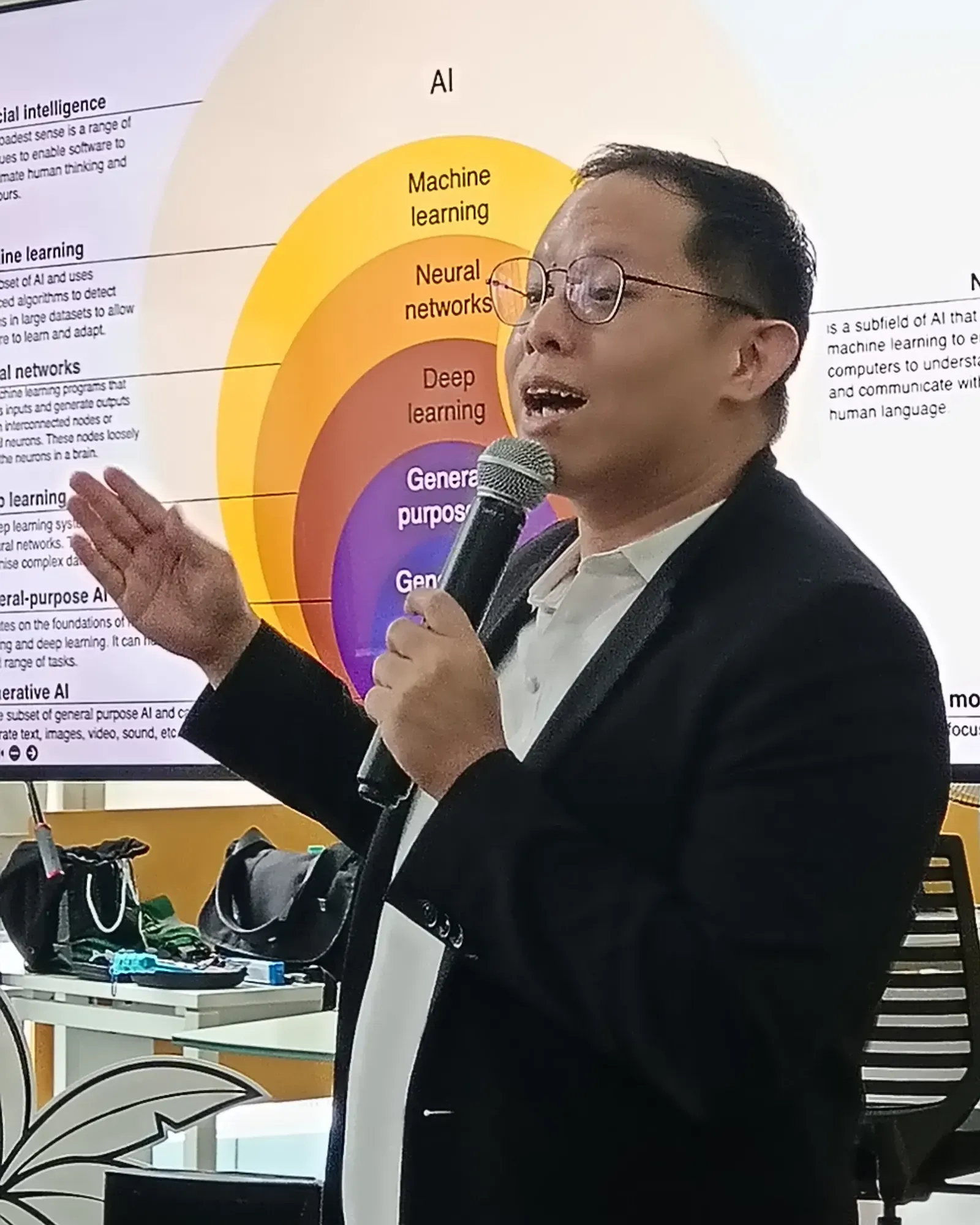
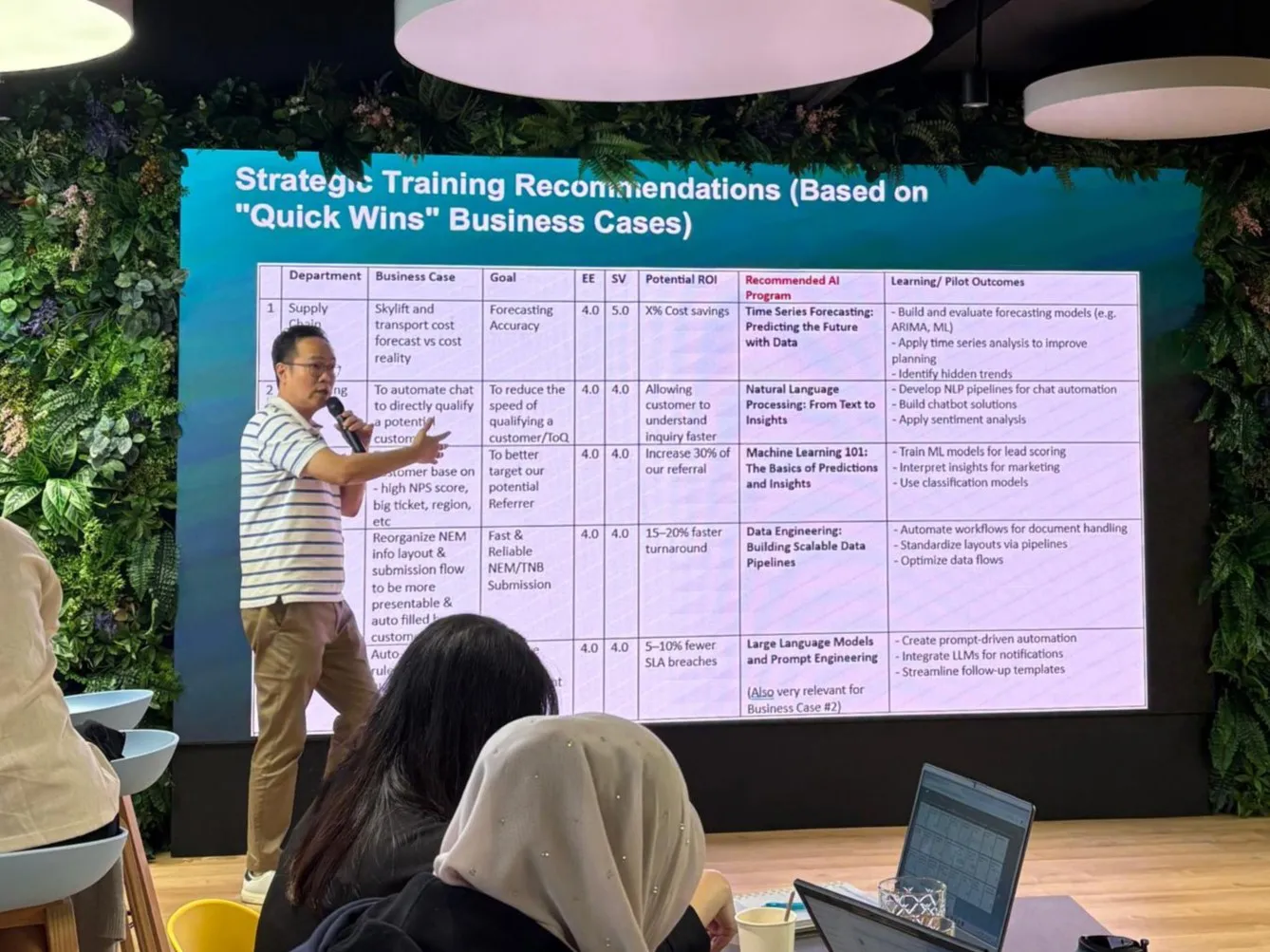
How we scope it
From your business cases to a recommended AI programme
Corporate AI training: full FAQ
The questions we get most from leaders, HR and L&D, technical teams, and finance, grouped by topic.
Strategy-Level Questions
How can AI specifically reduce our operational costs in (Industry X)?
You need to identify use cases in your company (or industry) where AI can directly reduce operational costs. For example, if you are a manufacturer and your QA team spends a lot of time manually classifying defects, an AI solution can automatically classify defects and improve efficiency, which leads to lower operational costs. Or if you are in HR at a bank and spend a lot of time manually sifting through hundreds of resumes each week, a GenAI plus intelligent workflow solution can automate the first-level screening of these CVs, saving time and effort.
What is the actual timeframe for seeing a productivity boost?
The timeframe depends on the complexity of your use cases. It can be almost immediate for low-hanging fruit or quick wins like report automation, email drafting, and social media content creation. For more complex use cases (for example, integrating AI into core operational systems or building custom workflows across multiple tools), you may see ROI in a few weeks to a couple of months, depending on their complexity and the level of integration required.
Can we train our non-technical staff to build AI workflows?
Of course. With the rise of Generative AI tools (such as ChatGPT, Gemini, and NotebookLM) and no-code/low-code workflow automation platforms, non-technical staff from functional departments like Sales/Marketing, HR, Finance, and Operations can now build AI workflows without needing support from developers.
How do we move from AI experimentation to real business impact?
You need to start by identifying use cases within your company or department that can deliver real business impact, such as increased profitability, cost reduction, or efficiency gains. To help you do that, we run Data and AI Strategy programs bundled with use-case brainstorming sessions so your teams can move from ad-hoc experiments to a focused portfolio of high-impact AI projects.
What is the ROI of AI training for our organization?
With our training programs, we don’t do generic AI training. We train your organization using real use cases that you have identified. Together, we dissect these use cases and give you a mix of core concepts and hands-on practice. By the end of the program, you will see how you have applied AI to an actual problem or opportunity and how that can drive positive ROI for your department or organization.
Should we start with GenAI literacy or technical AI capability?
Ideally, you should invest in both, but for different groups of people. Many organizations already have technical teams managing core systems (for example, core banking or core manufacturing platforms), and they benefit most from deeper technical AI capabilities such as Python, machine learning, and deep learning. The same organization will also have people in support functions (HR, Finance, Sales/Marketing, Operations), and they benefit more from GenAI literacy, prompt engineering, and no-code/low-code workflow intelligence skills so they can quickly apply AI in everyday work without becoming developers.
How do we build an AI roadmap aligned to our 3-5 year strategy?
To do this, you first need to understand where your organization (or department) currently stands in terms of AI maturity and capability, and where you want to be in the next 3-5 years. From there, you can apply a mix of strategies, such as upskilling, use-case development, and process plus culture/mindset changes, to close this gap. We guide senior leadership teams through this work in our Data and AI Strategy program, where we co-create an AI roadmap that supports your long-term business goals.
Are we late compared to other Malaysian companies?
No, you are not late. Most Malaysian companies are still at Level 2 or 3 of 5 on AI maturity, focused on reporting and simple use cases. Few have moved to deep integration, so the field is still open for anyone who can find and execute high-value use cases.
How do we prevent AI from becoming just a “buzzword initiative”?
To move beyond being just a buzzword, AI needs to be applied to real problems in your organization and deliver clear, measurable ROI or tangible benefits. That means prioritizing a few high-impact use cases, implementing them properly, and tracking outcomes like cost savings, efficiency gains, or revenue growth instead of running AI experiments for the sake of appearances.
How do we measure whether adoption is actually happening?
You measure adoption by tracking the real ROI from the AI initiatives you’ve deployed. This can be as simple as measuring the productivity uplift from smart usage of GenAI tools, or as complex as measuring the increase in revenue from an AI-driven product recommendation system.
What’s the difference between AI strategy vs digital transformation?
AI strategy is about how an organization uses AI to create value, whether that is increasing profits, reducing costs, or improving efficiencies in specific processes. Digital transformation is broader: it’s about modernizing the company’s processes, technology, and culture as a whole. AI is one part of digital transformation, acting as an accelerator that helps organizations make better use of their data and turn it into actionable insights.
Should we centralize AI capability or embed it into each department?
It is usually easier to centralize AI capability at the beginning, with an “AI department” or Center of Excellence working on organization-wide projects using standardized tools, frameworks, and SOPs. Once these foundations are mature, you can start embedding AI capability into each department, while a centralized project management office or AI hub oversees the different AI teams to maintain standards, governance, and knowledge sharing.
HR / L&D Questions
What AI skills are relevant for non-technical staff?
For non-technical staff, the most relevant skills are: Data and AI fundamentals and a practical introduction to how AI works and where it can (and cannot) add value in their day-to-day work.; GenAI and applied prompt engineering skills so they can use tools like ChatGPT effectively for drafting, analysis, and idea generation.; No-code/low-code workflow intelligence, so they can design and automate simple workflows without needing to write code or rely heavily on developers.
How do we structure beginner to intermediate to advanced learning paths?
It will depend on whether the learning path is for technical or non-technical staff. Please refer to our Training Programs for more details on how the paths are structured for different roles.
Should we train everyone or only selected departments?
Everyone should be trained in AI, at least at a basic literacy and GenAI usage level. Imagine one person in a department becoming 3x more productive with GenAI, if that person normally produces work worth “1 unit” a day, they are now effectively producing “3 units.” If you have 100 people in that department, that’s like adding the output of 200 extra people without increasing headcount, and across 10 departments with 1,000 employees, you’re looking at the equivalent of thousands of additional “productivity units” gained across the organization.
How do we assess AI readiness across the organization?
We can run an AI Readiness Audit for your company, and even for specific departments, to understand where you are today and where you want to be. This includes mapping your current AI maturity, clarifying your target state, and identifying the type of upskilling and capability building each department or the overall organization needs to close that gap.
Can AI training be HRDC-claimable?
Yes. All our courses are 100% HRDC-claimable, as we are a HRDC-registered training provider and academy.
How do we ensure employees don’t misuse public AI tools?
You can reduce misuse by combining clear policies, training, and safer alternatives.; Create clear AI policies that specify which tools can and cannot be used, and what types of data are never allowed to be entered into public tools.; Offer training on AI ethics and risks so employees understand data leakage, confidentiality, security, and the consequences of breaches.; Provide safe, enterprise-grade alternatives (for example, Copilot for Enterprise or Gemini for Workspace) so employees have secure tools they can rely on.; Avoid outright banning AI tools, because that usually drives “shadow AI” or underground usage instead of bringing it into a controlled environment.
What’s the difference between AI awareness vs applied AI training?
AI awareness (non-technical) focuses on understanding the fundamentals of AI and GenAI, plus what they mean for your business. Participants are exposed to local and global case studies relevant to their industry, how those use cases generate ROI, and the strategies, competencies, and skills required to move the AI maturity needle in the organization. These sessions usually include brainstorming to surface challenges and opportunities (use cases) within the organization that can be addressed with AI. Applied AI programs are more technical and hands-on. They cover areas such as GenAI, workflow automation, and machine learning/deep learning, and they show participants how to apply AI to the specific use cases identified during the awareness sessions so they can deliver the targeted ROI and business benefits.
How long should proper AI upskilling take?
It depends on your requirements and who is being upskilled. Are you upskilling non-technical or technical staff, and are they absolute beginners or do they already have some AI knowledge? We have a flexible program structure that caters to different starting points and program lengths, so please refer to our Training Programs for more details.
How do we overcome employee resistance or fear of job displacement by AI?
We strongly believe that AI is here to augment, not replace, employees. The goal is for AI to take over boring and repetitive tasks so people can focus on more value-adding work that AI cannot easily do, such as building client relationships, making complex judgment calls, solving ambiguous problems, or leading and influencing teams. To support this shift, we offer Data and AI Strategy programs for both executives and senior leadership teams that emphasize human-AI collaboration. These programs show how organizations can combine people and AI to increase profitability, reduce costs, and improve efficiency, while positioning employees to move up the value chain rather than be displaced.
Can you customize use cases to our industry instead of generic examples?
Yes, we can, and that’s one of our key strengths. Our AI trainers and consultants have real experience implementing AI in various industries, so we can relate directly to your context. About two weeks before the training, we work with you to identify and refine your own use cases, then build them into the program. This way, participants work on scenarios they recognize from their day-to-day jobs, making the training more relatable and helping them absorb and apply the learnings much more effectively.
GenAI-Specific Questions
What’s the difference between ChatGPT, Copilot, Claude, Gemini?
ChatGPT: A general-purpose assistant from OpenAI, strong at coding support, reasoning, writing, and a wide range of enterprise use cases. Copilot: Microsoft’s AI layer embedded inside Microsoft 365 and other Microsoft products, designed to work tightly with tools like Word, Excel, PowerPoint, Outlook, and Teams. Gemini: Google’s family of AI models, well suited for tasks that benefit from live web context and deep integration with the Google ecosystem (Workspace, Search, YouTube, etc.). Claude: Anthropic’s AI assistant, with a strong emphasis on safety and controllability, often favored in compliance-sensitive environments such as legal, finance, and healthcare. In essence, they are different foundation models and product ecosystems, each with its own strengths, integrations, and risk/comfort profile for businesses.
Should we use public AI or build internal LLM?
For most organizations, the more cost-effective and practical path is to use enterprise-grade AI delivered via secure chat interfaces or APIs. This lets you move fast, keep costs predictable, and rely on vendors who handle model training, scaling, and infrastructure. Building your own internal LLM only really pays off when you have very sensitive data, operate at large scale, and have differentiated use cases where deep model customization becomes a true competitive advantage, strong enough to justify the higher cost, complexity, and ongoing maintenance.
What are the security risks of using GenAI?
Some key risks include: Data leakage in prompts or system logs if sensitive information is pasted into the tool.; Malicious or harmful outputs that could mislead users or be exploited in social engineering.; Prompt injection attacks, where external content secretly manipulates the model’s behavior.; Dependency on third-party vendors for uptime, security controls, and data handling, which adds supply-chain and compliance risk.
How do we write better prompts?
You can write better prompts by: Breaking complex work into smaller, clear steps instead of asking for everything at once.; Adding a role, format, objective, and audience (for example: “You are a marketing manager. Write a 200-word email to busy CFOs to explain…”).; Providing more context and concrete examples so the model can mirror your style and expectations.; Adding constraints such as word limits, tone (“formal but friendly”), structure (bullet points, table), or do/don’t rules to keep the output on target.
Can GenAI be integrated into our workflow tools (e.g., n8n, Power Automate)?
Yes. Tools like n8n can orchestrate complex AI workflows by chaining multiple AI services and external systems through APIs and ready-made nodes. Power Automate can similarly connect to Azure OpenAI and other GenAI services, and integrate them with Microsoft 365 apps such as Teams, Outlook, and OneNote.
What tasks should NOT be automated by AI?
Avoid fully automating decisions that have significant human impact, such as credit approvals, hiring or firing decisions, and major medical or legal judgments. In these cases, AI can assist with analysis and recommendations, but a human should always review the output and make the final call.
How do we prevent hallucinations?
You reduce hallucinations by making the AI rely less on “guessing” and more on your trusted information.; Ground the AI with a trusted knowledge base (for example, using RAG so it retrieves from your documents instead of inventing answers).; Ask the AI to show its sources or citations so users can quickly verify where information comes from.; Implement confidence thresholds or guardrails (for example, instructing the AI to say “I don’t know” or escalate to a human when it’s uncertain or cannot find supporting documents).
Can AI access our internal knowledge base safely?
Yes. You can securely connect AI to your internal knowledge base by using retrieval-augmented generation (RAG) inside your own secured environment, combined with enterprise-grade AI services. This lets the model retrieve and use your documents at query time without training on them directly, while you keep full control over access, permissions, and data protection
Technical / Data Team Questions
Do we start with Python or low-code AI tools?
You don’t need to start with Python, especially with the wide range of GenAI and low‑code/no‑code workflow tools (like n8n and Power Automate) now available. These tools let you skip most of the “coding” and go straight to using AI for tasks such as data analysis, content generation, and workflow automation. If you want to go deeper, into advanced analytics, custom models, data engineering, or highly customised solutions, then it makes sense to invest in Python and more technical AI skills.
How clean does our data need to be before AI works?
You don’t need “perfect” data, but you do need a minimum level of structure and quality. That means consistent schemas and definitions, reasonable data types, and no major issues like massive missing values or obviously wrong ranges. If these basics are not in place, models will mostly learn noise, produce inaccurate results, and your dashboards may become harder to interpret rather than more useful. GenAI can tolerate messy text better, for example, different writing styles, inconsistent formatting, or informal language, but it still cannot fix fundamentally wrong facts, biased labels, or missing critical fields. In short, AI can work with “good enough” data, but it cannot magically rescue bad data.
Is machine learning necessary or is GenAI enough?
GenAI is excellent for tasks like summarization, drafting, Q&A, and code generation, but it is not a substitute for traditional machine learning in areas like forecasting, churn prediction, anomaly detection, or credit scoring. You typically use GenAI for language-heavy, unstructured tasks, and machine learning for structured, data-driven predictions and optimization.
How do we build dashboards that executives will use?
Keep visuals simple and focused, and pair them with short narratives or AI-generated summaries to help non-technical leaders interpret the charts quickly. Make sure each dashboard answers a small set of recurring executive questions on a single screen, so they don’t have to click through multiple pages to get the story.
How do we transition from descriptive to predictive analytics?
Start by making sure you have stable, trusted, and consistent data sources, ideally with near real-time updates for key metrics. Then, pilot simple predictive models with clear human oversight, focusing on specific business problems (for example, lead scoring, churn risk, or demand forecasting) rather than trying to predict everything at once. Once a model is in production, monitor its performance, retrain it when it starts to drift, and regularly check that its predictions still make sense to domain experts. Throughout this process, ensure PDPA compliance and handle any personal or sensitive data carefully, with proper consent, access controls, and anonymization where appropriate.
Should we build internal AI capability or outsource?
It really depends on your company’s strategy and priorities. Some organizations want an internal AI team so they can control 100% of the critical IP, data, and decision-making around AI. Others prefer to focus on their core business and outsource most of the technical or AI work to specialist vendors for speed and lower overhead. Many companies adopt a hybrid approach: they keep governance, problem definition, and overall AI strategy internal, while outsourcing infrastructure and parts of the implementation to trusted partners. In all cases, make sure your vendors remain fully accountable for PDPA compliance and data protection through strong contracts, security standards, and ongoing monitoring.
How do we integrate AI with our existing Microsoft 365 or Google Workspace?
Microsoft 365 Copilot is embedded across Word, Excel, PowerPoint, Outlook, Teams, SharePoint, and other Microsoft 365 applications. It uses an orchestration layer that routes your requests to OpenAI’s latest GPT-5 models (and other models) while grounding them in your Microsoft Graph data. Gemini for Workspace is integrated into Gmail, Docs, Sheets, Slides, Meet, and Drive, using Google’s Gemini models with your Workspace content as context. It continues to roll out new capabilities across Workspace SKUs, though availability and feature depth can still vary by edition and region.
Adoption & Cultural Questions
How do we ensure AI doesn’t threaten jobs? How do we position AI as augmentation, not replacement?
AI should handle tactical, repetitive work, while humans focus on strategic, emotional, and creative tasks that machines are not suited for. Instead of replacing people, the goal is to offload boring, routine activities to AI so employees can spend more time on judgment, relationships, problem-solving, and innovation. To make that real, employees need to be upskilled to apply AI within the business domains where they already have deep expertise, so they become “AI-augmented” professionals rather than being sidelined. The key is to stay in control of AI. Treat it as a powerful assistant and tool, not as the decision-maker or replacement for human responsibility.
How do we change mindset from “manual process” to “AI-first thinking”? How do we get middle management buy-in?
A powerful way is to show concrete success stories from peers in your industry, locally and around the region, highlighting high-value AI and automation use cases that increased profitability and reduced costs. Just as importantly, you want to show how automation can drastically reduce manual processes and free staff to move into higher-level work, such as proactive customer engagement, process improvement, or data-driven decision-making, instead of repetitive admin tasks. From there, you can run internal “AI use-case showcases” and small pilot projects so employees experience these benefits first-hand, which helps shift mindsets from “AI as extra work” to “AI as the default way we work.”
How do we scale AI from pilot to enterprise-wide adoption?
First, make sure the pilot is working: the most important test is whether it meets the key KPIs you defined upfront (for example, cost savings, error reduction, faster turnaround times, or uplift in revenue). If the pilot delivers the expected impact, you can then scale it by: Integrating the AI solution into core systems and everyday workflows rather than leaving it as a standalone tool.; Rolling it out in stages across more teams, supported by training, playbooks, and clear ownership so people know when and how to use it.; Reusing the same patterns, infrastructure, and governance from the successful pilot as a template for future AI use cases, creating a repeatable “AI rollout” process.
Commercial & Practical Questions
Is 1-day training enough?
Yes. Most of our AI programs are designed as 1-day or 2-day intensive sessions that are packed with practical content and hands-on exercises. The main exception is our AI Capstone Project, which can run for up to 10 days because we mentor you through building an actual AI pilot, these 10 days are staggered over several weeks so teams can apply what they learn in between sessions.
Is this training 100% HRD Corp claimable?
Yes. Every course is 100% HRDC-claimable. We are an HRDC-registered training provider, and we help with the claim paperwork.
What should happen after the training?
With our training programs, we don’t do generic AI training. We work with your team’s own use cases, identified before the training, then dissect them and walk you through a mix of core concepts and hands-on practice. After the program, you should have a working solution or prototype applied to a real problem or opportunity, plus a clear view of the productivity gains and ROI it can bring to your department or organization, along with concrete next steps to scale or refine it.
Can you include hands-on workshops?
Yes. All our applied AI training programs are highly hands-on and interactive, not just lecture-based. Participants work directly with real tools, datasets, and workflows so they can immediately practice what they learn on realistic scenarios from your business. We also encourage group exercises, live problem-solving, and mini-projects so teams leave with both confidence and concrete assets they can reuse after the workshop.
Can we bring our real company data into the session?
Yes, you can, and that’s one of our key strengths. Our AI trainers and consultants have real experience implementing AI across multiple industries, so we are comfortable working with real-world datasets. About two weeks before the training, we work with you to select and prepare suitable use cases and sample data, then build them into the program. This way, participants work on familiar scenarios using their own company data, making the training far more relatable and helping them absorb and apply the learnings much more effectively.
What deliverables will participants leave with?
Participants will leave with concrete deliverables matched to the specific program they attend. These include things like AI‑enhanced workflows, documented use cases, prompt libraries, automation prototypes, action plans they can immediately apply back at work, and LinkedIn/GitHub showcases. Please refer to our Training Programs for specific deliverables.
Can we measure productivity improvements after 3 months?
Definitely. We always recommend picking a specific challenge or opportunity as a use case, starting small, and setting a clear ROI or productivity target at the very beginning, such as “reduce processing time by 20% within 3 months.” You then track before-and-after metrics (for example, time per task, error rates, volume handled, or revenue per headcount) so you can see whether the target is being met. Over the next few weeks and months, you can adjust and optimize your data, prompts, workflows, or model configuration to move closer to the target. If the original target turns out to be unrealistic, you can recalibrate it based on what the data shows, either scaling the solution where it works, or redesigning or retiring it if the impact is consistently below expectations
What is included in corporate AI training with GrowthPro Asia?
Three role-specific tracks, Leadership & Executive AI Strategy, Applied Business AI, and AI Engineering & Systems Intelligence, plus an optional Capstone that ends in a deployed pilot on your data. Training can run in-house on your own use cases or as scheduled cohorts.
Who is corporate AI training for?
Senior leaders setting AI direction, HR and L&D and functional teams adopting AI in their workflows, and technical teams taking pilots to production. Each track is built for its audience, not one-size-fits-all.
Where do you deliver?
Across Malaysia, Kuala Lumpur, Petaling Jaya and Penang, with delivery into Singapore and the wider ASEAN region.
Governance, Ethics & Local Regulation Questions
How do we comply with the Malaysia National AI Roadmap and the AI Code of Ethics?
The Malaysia National AI Roadmap sets the country’s strategic direction for AI, but the key reference for organizations is the National Guidelines on Artificial Intelligence Governance and Ethics (AIGE) issued by MOSTI. These guidelines are aligned with regional and global frameworks (including ASEAN and UNESCO) and outline seven core principles, fairness, reliability and safety, privacy and data security, inclusivity, transparency, accountability, and human benefit, which should be implemented alongside PDPA requirements. As a practical minimum for “Responsible AI” compliance, organizations are encouraged to establish an AI governance or ethics committee, conduct impact and risk assessments for higher-risk use cases, and ensure documented human-in-the-loop review for consequential decisions. Malaysia has no enacted AI-specific law yet, so AIGE is a voluntary national framework rather than a binding statute. Treat it as the standard to build to now, alongside your binding PDPA obligations, and stay ready as governance tightens.
What happens to our proprietary data if we use ChatGPT/Gemini?
This is a valid concern, and the answer depends on whether you use public accounts or enterprise-grade setups. With public, consumer-grade tools (for example, free personal ChatGPT or consumer Gemini on the web), your conversations may be logged and, depending on your settings, can be used to improve future models. Security is typically limited to basic account login, and you have less contractual control over where data is stored and how long it is kept. With enterprise-grade AI (ChatGPT Team/Enterprise, API usage, or Gemini for Workspace/Enterprise), vendors contractually commit not to use your prompts or documents to train their foundation models and to keep your data within agreed cloud boundaries, with stronger encryption, SSO, and role-based access controls. In these setups, your corporate data remains your property and is isolated from public training corpora, which is why they are strongly recommended for any sensitive or proprietary information.
How do we prevent 'AI Bias' in our hiring or credit scoring processes?
This is a common concern for HR and financial institutions given the legal and reputational risks of automated decisions. You reduce AI bias by combining good data practices, governance, and human oversight: Keep a human-in-the-loop for high-impact decisions, so AI recommendations are reviewed and can be overridden by trained staff.; Clean up historical data to remove or minimize discrimination patterns and proxy variables (for example, features that indirectly encode gender, race, or socioeconomic status).; Regularly monitor model outputs with fairness metrics, run bias audits, and retrain or adjust the model when you detect drift or unfair patterns across groups.; Use dedicated bias-detection and fairness toolkits to quantify and mitigate bias in your models.
Turn AI strategy into a working pilot, and prove the ROI.
Start with the free 3-hour AI Strategic Briefing. See agentic AI run real workflows, and leave with an automation roadmap, a prompt library, and a pilot playbook.